Release notes - i2 Overwatch Add-on 1.2.0
This document provides an overview of the new features, system requirements, and known issues for i2 Overwatch 1.2.0.
Important notices
⚠️ Installation
i2 Overwatch requires that i2 Analyst's Notebook 10.1.1 has been installed.
To install the i2 Overwatch, extract all components from the compressed file using the Extract All... option in the Windows right-click menu. Navigate to the root of the extracted folder and run setup.exe, then follow the installation prompts.
Deployment Options
i2 Overwatch can be deployed in a number of ways, depending on your requirements. The following deployment options are available:
If you require an Overwatch iBase deployment, a semantic library is provided that you can use to build an iBase that will work with Overwatch. This file is OverwatchSemanticTypeLibrary.mtc
If you require an Overwatch i2 Analyze deployment, an example schema is packaged under OverwatchSchema.xml, it uses the correct semantic ids that will be used by Overwatch, use this schema as a base line or use as inspiration.
If you run in a standalone environment, you can use the i2 Overwatch installer. No additional set up is required.
Conflicts with i2 Insights
Note that due to conflicting configurations, i2 Overwatch and the i2 Insights add-on cannot be installed simultaneously with Analyst's Notebook. The impact of this restriction on current users is under investigation, and use cases are being explored so a plan can be developed to address the conflict.
Features
Release highlights
The following new and updated features are available in this release:
| i2 Overwatch |
|---|
| Import historic location data |
| Support for MILSTD2525D |
Release highlight details
Import historic location data
You can now import historic location data for a marker. The imported data consists of several latitude, longitude, and optional timestamp, entries. These will be displayed on the map as either:
- a set of standalone points
- a track - where the points are connected by a line in timestamp order
Import data format
Historic location data can be imported from two file types - GPX or CSV.
In the case of GPX, the latitude, longitude, and timestamp entries will be extracted, and any other data in the file will be discarded.
A CSV must contain latitude and longitude columns, and optionally a timestamp column.
Valid column headers are:
- For latitude - latitude, lat, y, lat_deg, or latitude_deg
- For longitude - longitude, lon, lng, long, x, lon_deg, or longitude_deg
- For timestamp - timestamp, time, datetime, date, utc, iso8601
The latitude and longitude columns should be in decimal degrees format.
The timestamp column should be in ISO8601 format.
If no column headers are provided, i2 Overwatch will attempt to deduce the ordering. Failing that it will fall back to "latitude, longitude, timestamp".
For example, the following is a valid CSV file:
latitude,longitude,timestamp
51.5074,-0.1278,2025-10-24T10:00:00Z
48.8566,2.3522,2025-10-24T11:00:00Z
⚠️ Warning: A mix of entries with and without timestamps in one file is not supported
⚠️ Warning: Imports of over 1000 points are likely to cause performance degradation. This will be addressed in a future release
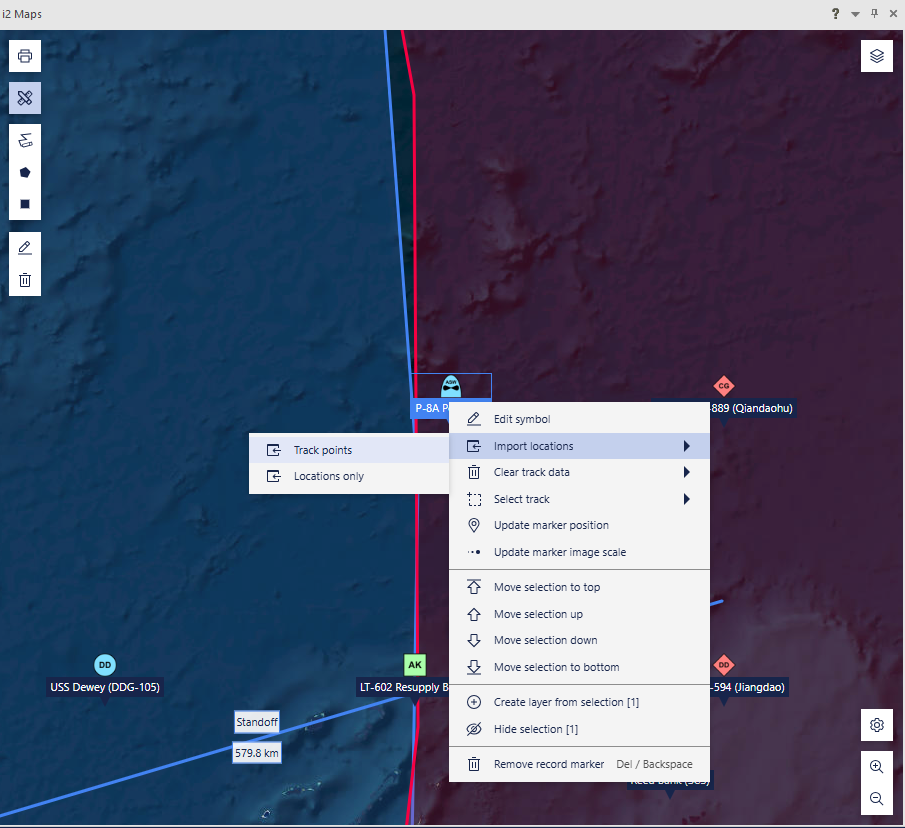
Figure 1: Location data can be imported from the marker's context menu
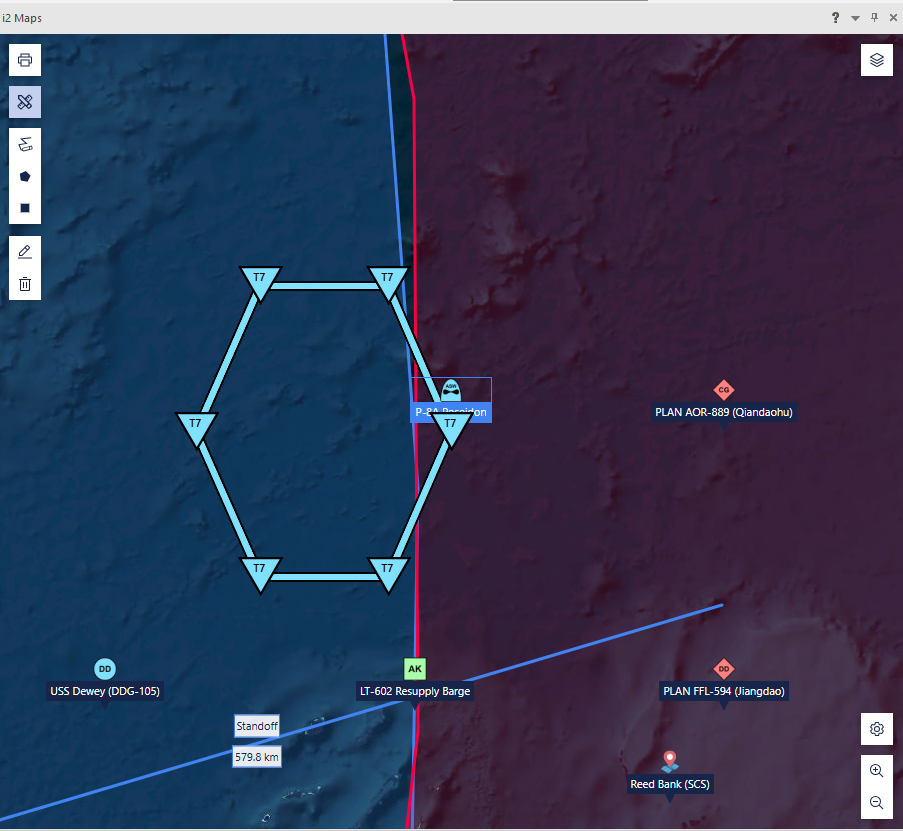
Figure 2: A track is shown as a series of points connected by a line
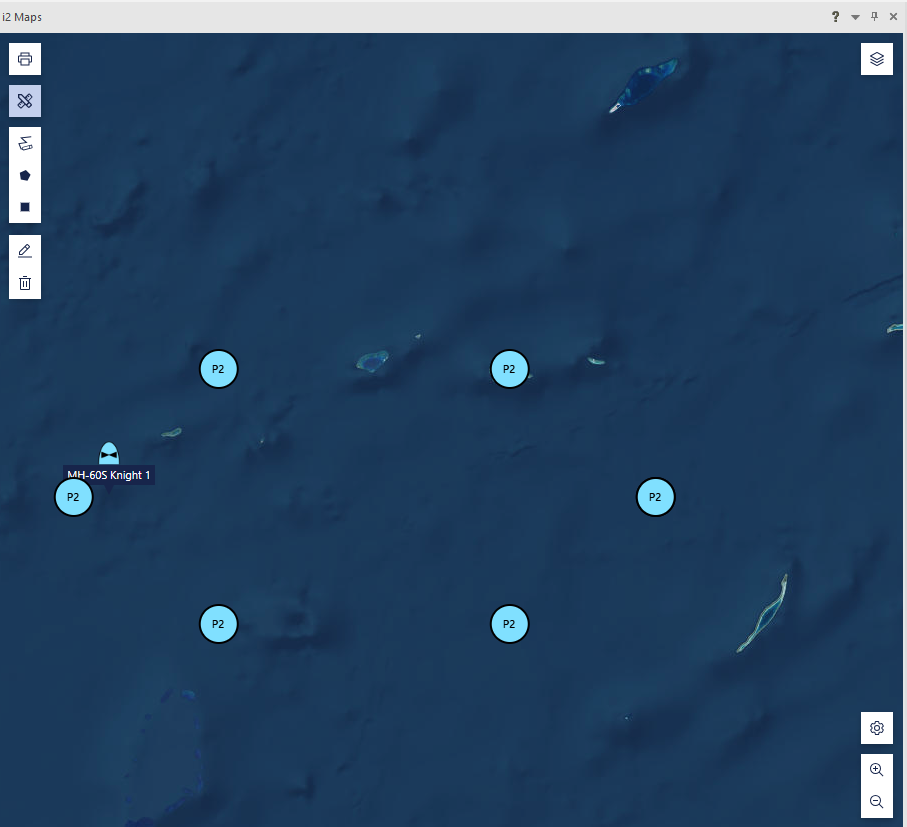
Figure 3: Importing locations only shows the points without a line
Interactions
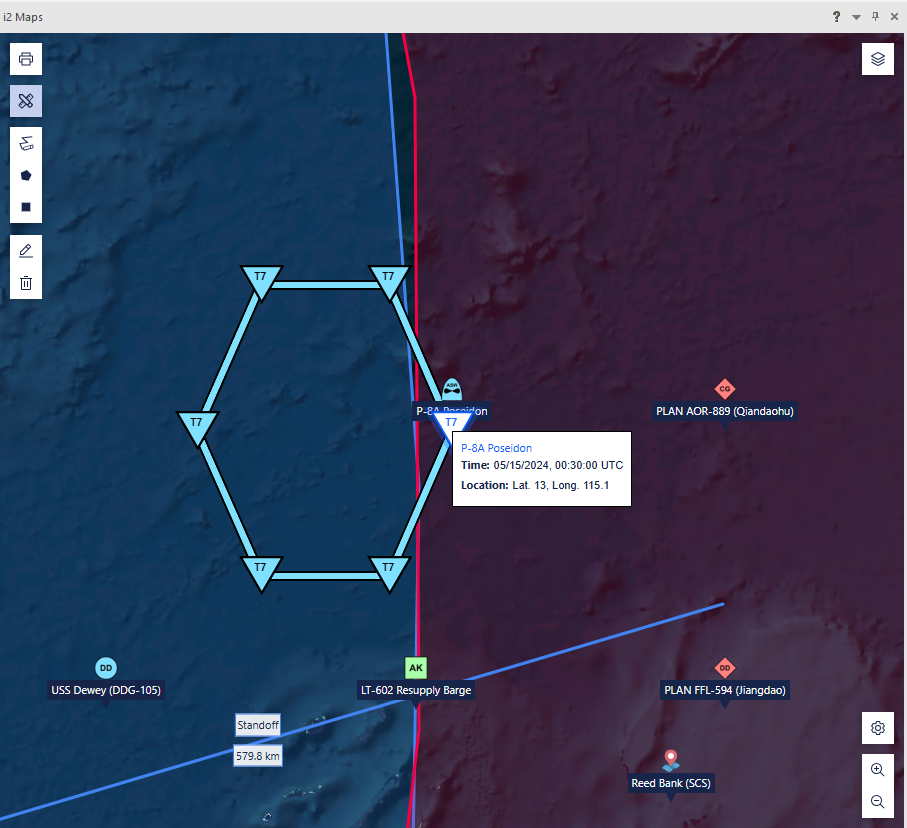
Figure 4: Clicking a point will show a popover detailing the position and timestamp.
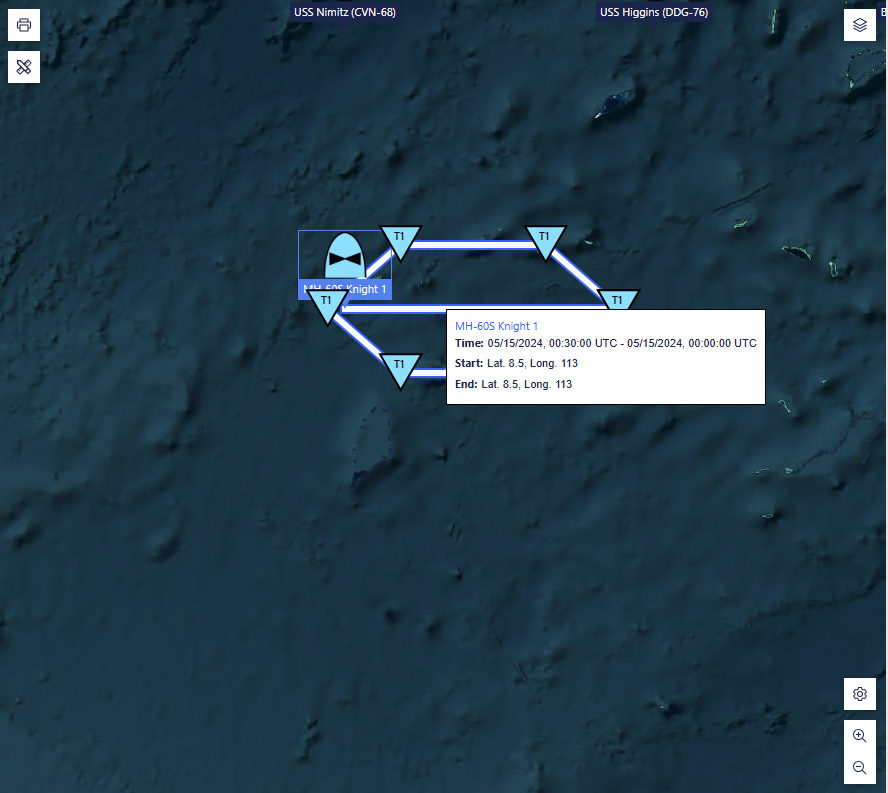
Figure 5: Clicking a track line will show a summary for the entire track.
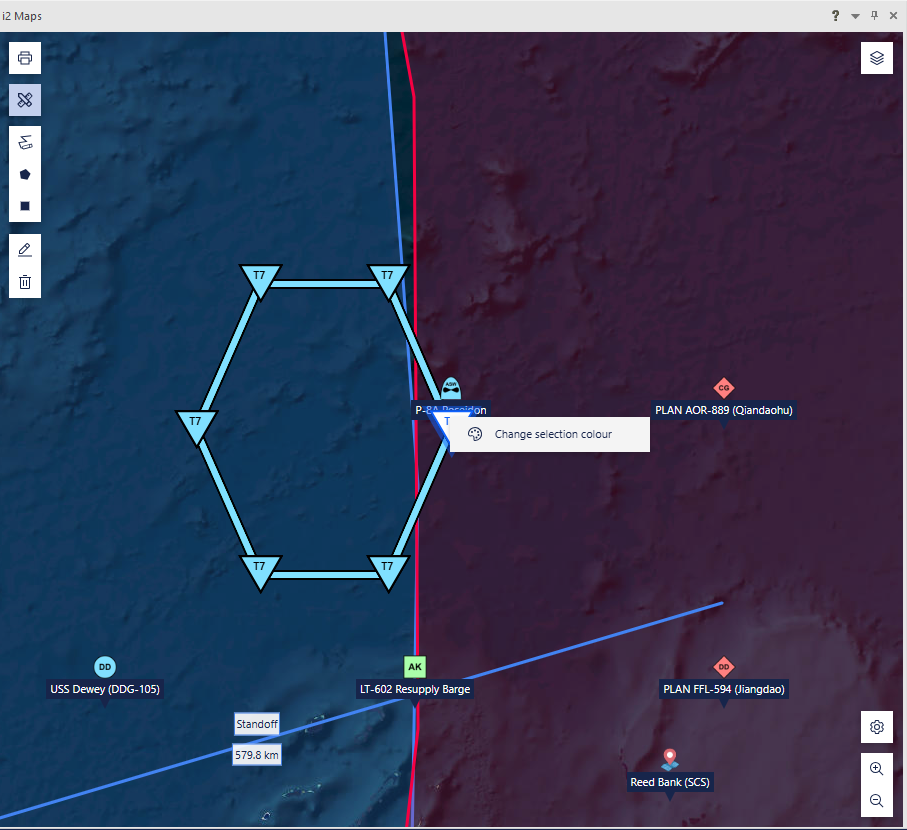
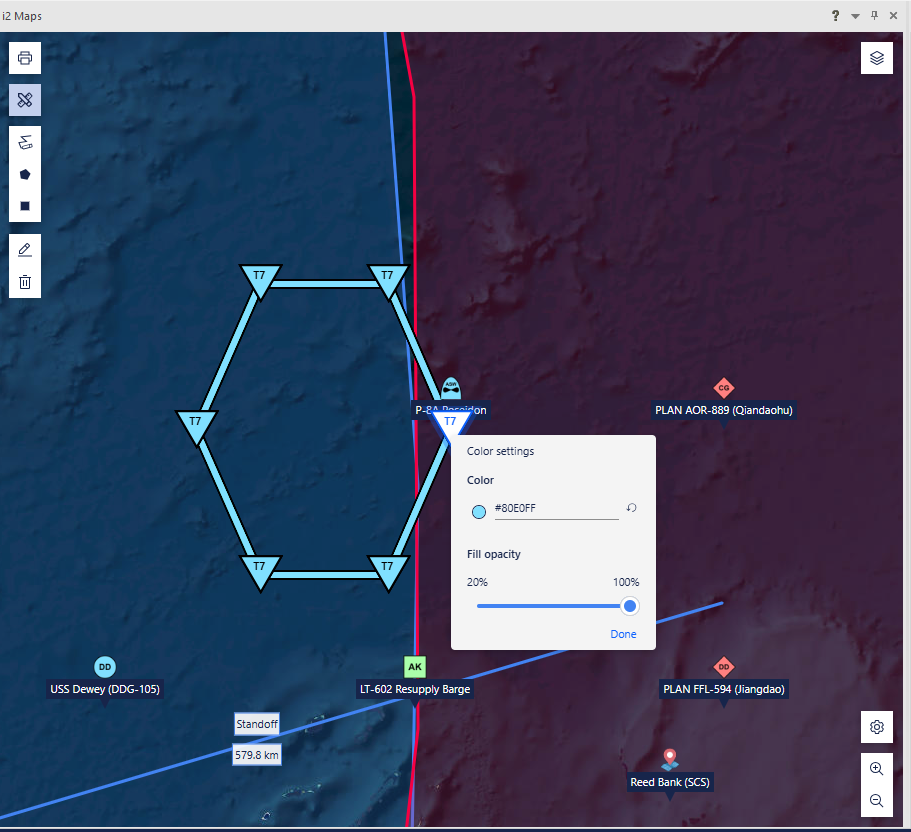
Figure 6: Right-clicking a point or track line allows you to change its color
Note: You can change the colour of multiple points/lines at once by first selecting them all using ctrl + click
Visibility toggles
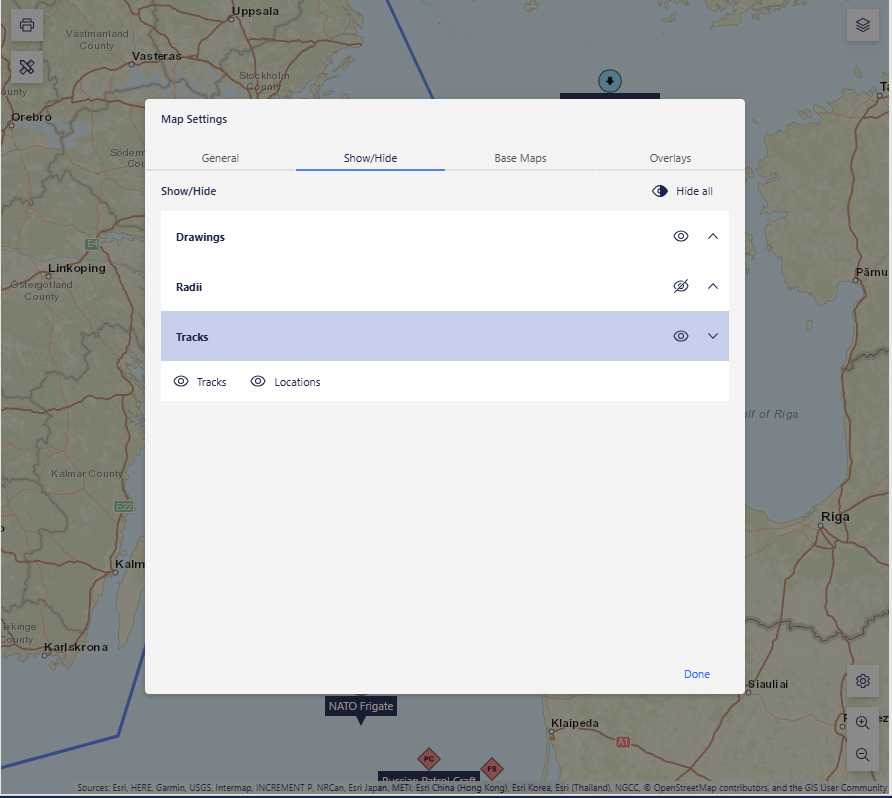
The settings menu allows you to show or hide tracks and standalone points
Support for MILSTD2525
You can now configure i2 Overwatch to use the MILSTD2525 spec instead of APP6. You can do this by adding symbolStandard=MILSTD2525D to OverwatchRuntime.properies, which is typically found in C:\ProgramData\i2\Overwatch\.
Version by Version comparison
The following table shows a comparison of features between recent versions of i2 Overwatch:
🆕 = New Feature ✅ = Existing Feature ❌ = Feature Removed/Obsolete
| FEATURES | i2 Overwatch 1.2.0 | i2 Overwatch 1.1.1 | i2 Overwatch 1.1.0 |
|---|---|---|---|
| Import historic location data | 🆕 | ||
| MILSTD2525D | 🆕 | ||
| Improved layer selection | ✅ | 🆕 | |
| Show and hide layers/markers | ✅ | 🆕 | |
| Layer Contents Ordering | ✅ | 🆕 | |
| APP6D | ✅ | ✅ | 🆕 |
| Drawing tools | ✅ | ✅ | 🆕 |
| Layers | ✅ | ✅ | 🆕 |
| Radii | ✅ | ✅ | 🆕 |
| Custom Tile Server support | ✅ | ✅ | 🆕 |
| Mapping Enhancements | ✅ | ✅ | 🆕 |
| Polygon Seeding | ✅ | ✅ | 🆕 |
| Print map | ✅ | ✅ | 🆕 |
Fixed and known issues
The issues that have been fixed in this release, and known issues.
Fixed issues
| Issue Number | Issue title |
|---|---|
| Not applicable |
Known issues
| Issue Number | Issue title |
|---|---|
| Not applicable |
Download information
Customers who have entitlement can request copies of i2 products.
For more information, see Where can I download the latest i2 products?
System requirements
The following tables shows the system requirements for this release, and previous releases. These system requirements should be used to ensure that the setup you are running is fully supported. Ensure that existing deployments are upgraded to currently supported versions of all the software required.
🆕 = Newly supported ✅ = Supported ❌ = No longer supported
Operating systems
| OPERATING SYSTEMS | i2 Overwatch 1.2.0 | i2 Overwatch 1.1.1 | i2 Overwatch 1.1.0 |
|---|---|---|---|
| Microsoft Windows 11 Enterprise x64 (64-bit) | ✅ | ✅ | ✅ |
| Microsoft Windows 11 Pro x64 (64-bit) | ✅ | ✅ | ✅ |
| Microsoft Windows 10 Enterprise x64 (64-bit) | ✅1 | ✅1 | ✅1 |
| Microsoft Windows 10 Pro x64 (64-bit) | ✅1 | ✅1 | ✅1 |
| Microsoft Windows Server 2022 Datacenter Edition | ✅ | ✅ | ✅ |
| Microsoft Windows Server 2022 Standard Edition | ✅ | ✅ | ✅ |
| Microsoft Windows Server 2019 Datacenter Edition | ✅ | ✅ | ✅ |
| Microsoft Windows Server 2019 Essentials Edition | ✅ | ✅ | ✅ |
| Microsoft Windows Server 2019 Standard Edition | ✅ | ✅ | ✅ |
| Microsoft Windows Server 2016 Datacenter Edition | ✅1 | ✅1 | ✅1 |
| Microsoft Windows Server 2016 Essentials Edition | ✅1 | ✅1 | ✅1 |
| Microsoft Windows Server 2016 Standard Edition | ✅1 | ✅1 | ✅1 |
1 Microsoft Windows 10 Pro and Windows Server 2016 support will be deprecated in a future Analyst's Notebook release.
Note: i2 products are supported on hardware virtualization environments that run any of the operating systems that are listed in the detailed system requirements. When you run in a virtual environment, any issues that can be replicated by i2 in a supported operating system are addressed by using the standard support policy. Trial editions of i2 Analyst's Notebook cannot be run in virtualized environments.
Prerequisites
| SOFTWARE PREREQUISITES | i2 Overwatch 1.2.0 | i2 Overwatch 1.1.1 | i2 Overwatch 1.1.0 |
|---|---|---|---|
| i2 Analyst's Notebook 10.1.1 | ✅ | ||
| i2 Analyst's Notebook 10.1.0 - Test Fix 1 | ✅ | ✅ |
Hardware
| Hardware requirements | Minimum | Recommended |
|---|---|---|
| Disk space | 1GB for installation plus additional working space | |
| Processor | Intel or AMD processor with 64-bit and SSE 4.2 support | |
| 2GHz or faster | ||
| Memory | 8GB | 16GB |
| Display | 1280 x 768 | 1920 x 1080 |
Language support
i2 products are tested on a number of various regional variations of operating systems. At this release, i2 Overwatch is not translated, and is available in English only.
Operating system language support
i2 supports this product on the following regional versions of the supported operating systems:
| Language Group/Language | Language Collection | Support Status |
|---|---|---|
| Western Europe and USA | Basic | ✅ |
| Central Europe | Basic | ✅ |
| Baltic | Basic | ✅ |
| Cyrillic | Basic | ✅ |
| Turkic | Basic | ✅ |
| Arabic | Complex Script | ✅ |
| Japanese | East Asian | ✅ |
| Korean | East Asian | ✅ |
| Traditional Chinese | East Asian | ✅ |
| Simplified Chinese | East Asian | ✅ |
| Thai | Complex Script | ❌ |
| Vietnamese | Complex Script | ❌ |
| Greek | Basic | ❌ |
| Hebrew | Complex Script | ❌ |
| Indic | Complex Script | ❌ |
| Georgian | Complex Script | ❌ |
| Armenian | Complex Script | ❌ |
| Dhivehi | Complex Script | ❌ |
| Galician | Complex Script | ❌ |
| Gujarati | Complex Script | ❌ |
| Kannada | Complex Script | ❌ |
| Kyrgyz | Complex Script | ❌ |
| Mongolian (Cyrillic) | Complex Script | ❌ |
| Punjabi | Complex Script | ❌ |
| Syriac | Complex Script | ❌ |
| Telugu | Complex Script | ❌ |
Data support
i2 products support unicode data.
Translations
The following languages are supported:
| Translations | i2 Overwatch |
|---|---|
| English | ✅ |