Release notes - i2 Insights 1.0.2
This document provides an overview of the new features, system requirements, and known issues for i2 Insights 1.0.2.
Important notices
⚠️ Installation
i2 Insights requires that i2 Analyst's Notebook 10.1.0 or later has been installed with support for i2 Analyze enabled. This is the default for a Typical installation, however in a Custom installation it is possible that i2 Analyze was not selected.
To install the i2 Insights, extract all components from the compressed file using the Extract All... option in the Windows right-click menu. Navigate to the root of the extracted folder and run setup.exe, then follow the installation prompts.
⚠️ Upgrade
You cannot use the Modify or Repair options to upgrade i2 Insights. You must uninstall 1.0.1 before you can install 1.0.2.
Features
Release highlights
The following new and updated features are available in this release:
| i2 Insights |
|---|
| New Provider Support |
| Device Extractions Support |
| Automatic Number Plate Recognition Support |
| Colocation Analysis |
| Default Column Headers |
| Stabilization and Normalization |
New Provider Support
i2 Insights now supports Canada and South Africa call records.
Support has been added for the following providers:
Canada:
- Bell
- Freedom
- Rogers
- TELUS
South Africa:
- Cell C
- MTN
- Telkom
- Vodacom
Device Extractions Support
i2 Insights now supports device extraction data ingestion for MSAB XLSX files.
This will be viewable under Communications.
In order to obtain the MSAB XLSX export files (using XAMN Viewer) in the format expected by i2 Insights, the following steps must be followed:
- Press the
Report/Exportbutton (Ctrl + Eshortcut in Windows). - Choose
Excelfrom theOutput formatssection and then pressNext. - Make sure that
Include Exhibit datais checked in theContentsection and then pressNext. - Press the
Exportbutton.
Note: The sections which were not mentioned above should be used with their default configuration
From the MSAB XLSX export files the following sheets (if present) are ingested and processed:
Exhibit Data(mandatory to be present)Contacts Contacts(optional)Calls(optional)Messages SMS(optional)Messages MMS(optional)Messages Chat(optional)
If Exhibit Id (within Exhibit Data sheet) is missing, the user must provide a valid identifier, for the file to be correctly ingested and processed.
The contents extracted from MSAB XLSX export files will be viewable under Communications.
Automatic Number Plate Recognition Support
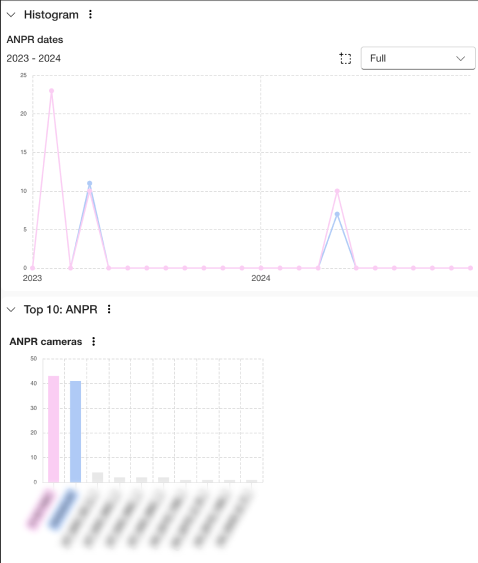
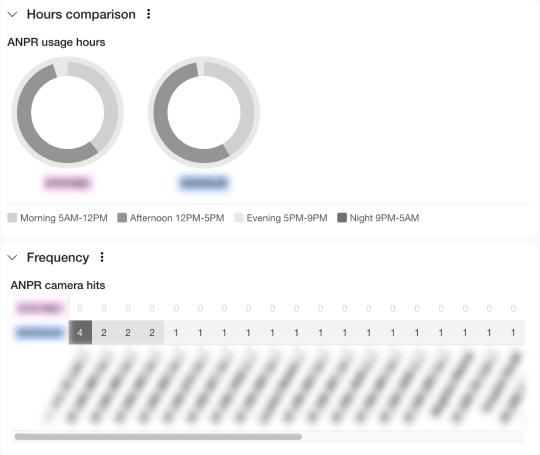
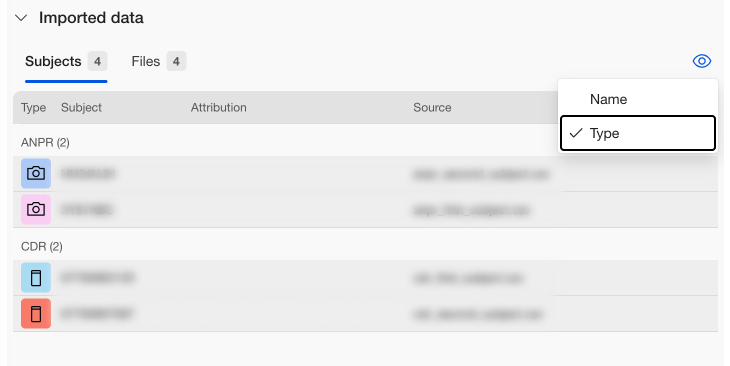
i2 Insights now supports ingestion of Automatic Number Plate Recognition data from NAS.
This includes:
- A new set of dashboard components in the Analyze View for ANPR camera activity.
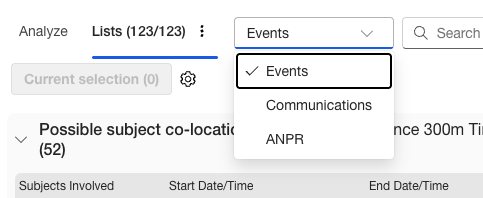
- A new list view for ANPR.
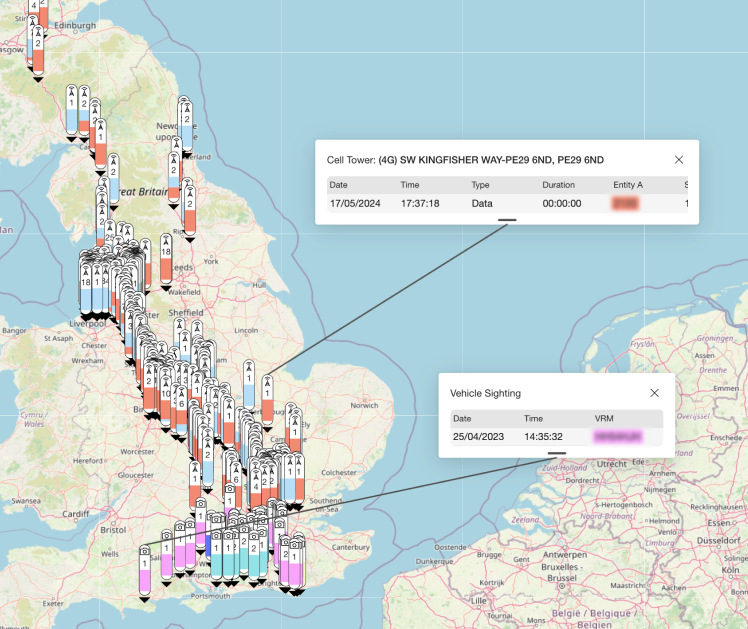
- Additional map markers for vehicle sightings.
- Integration of ANPR data from Insights to Analyst Notebook charts.
- Additional filtering options to be able to distinguish ANPR from Communications data along with combined filtering (Events).
Colocation Analysis
i2 Insights now includes colocation analysis capabilities.
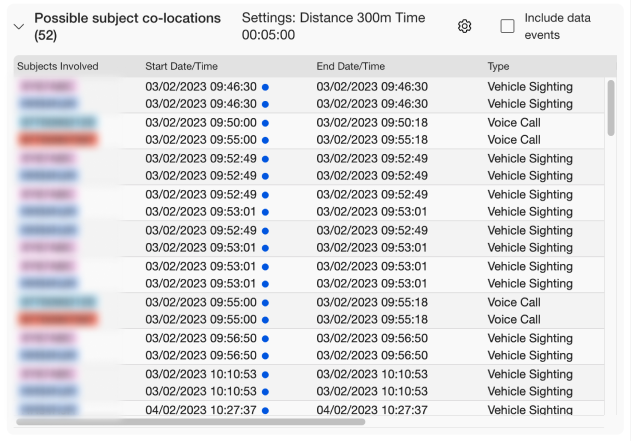
This new feature identifies possible colocations between different subjects across both ANPR and call data and is available as part of the Intelligence View's List view panel and includes:
- New list view panel for viewing colocations between subjects.
- An indicator to mark which space and time for the subject events the colocations occurred.
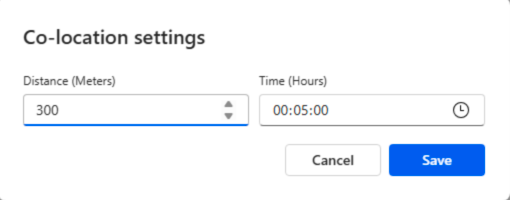
- Ability to set the distance and time windows for colocation detection.

Default Column Headers
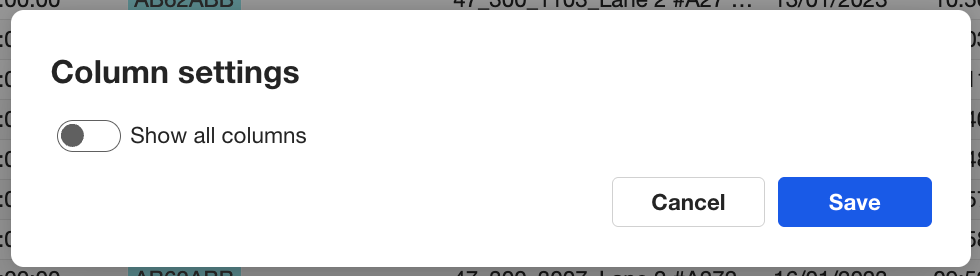
The list view now shows a default view with reduced columns, this can be changed to show all headers within the Column settings
There is a default view for Events, Communications, and ANPR within the list view and a reduced header view for Vehicle Sightings and Cell Tower data.
Stabilization and Normalization
This release contains improvements to how we parse and normalize communication data for the following UK telecom providers:
- Three
- Vodafone
- EE
- O2
Version by Version comparison
The following table shows a comparison of features between recent versions of Insights:
🆕 = New Feature
✅ = Existing Feature
❌ = Feature Removed/Obsolete
| FEATURES | i2 Insights 1.0.2 | i2 Insights 1.0.1 | i2 Insights 1.0.0 |
|---|---|---|---|
| Data Management | ✅ | ✅ | 🆕 |
| Intelligence View - Dashboards | ✅ | ✅ | 🆕 |
| Intelligence View - Lists | ✅ | ✅ | 🆕 |
| Mapping Enhancements | ✅ | ✅ | 🆕 |
| Analyst's Notebook Integration | ✅ | ✅ | 🆕 |
Supported File Types
The following file types are supported in this release:
- XLSX
- CSV
Call Data Records are supported by following providers in this release:
- Vodafone
- O2
- H3G
- EE
- BT
- CDAN
- Bell
- Freedom
- Rogers
- TELUS
- Cell C
- MTN
- Telkom
- Vodacom
Device extractions data is supported from the following providers in this release:
- MSAB
ANPR data is supported from the following providers in this release:
- NAS
Fixed and known issues
The issues that have been fixed in this release, and known issues.
Fixed issues
| Issue Number | Issue title |
|---|---|
| DT00536 | (Case 29648) Report correct version number in About box |
Known issues
| Issue Number | Issue title |
|---|---|
| Not applicable |
Download information
Customers who have entitlement can request copies of i2 products.
For more information, see Where can I download the latest i2 products?
System requirements
The following tables shows the system requirements for this release, and previous releases. These system requirements should be used to ensure that the setup you are running is fully supported. Ensure that existing deployments are upgraded to currently supported versions of all the software required.
🆕 = Newly supported ✅ = Supported ❌ = No longer supported
Operating systems
| OPERATING SYSTEMS | i2 Insights 1.0.2 | i2 Insights 1.0.1 |
|---|---|---|
| Microsoft Windows 11 Enterprise x64 (64-bit) | ✅ | ✅ |
| Microsoft Windows 11 Pro x64 (64-bit) | ✅ | ✅ |
| Microsoft Windows 10 Enterprise x64 (64-bit) | ✅1 | ✅1 |
| Microsoft Windows 10 Pro x64 (64-bit) | ✅1 | ✅1 |
| Microsoft Windows Server 2022 Datacenter Edition | ✅ | ✅ |
| Microsoft Windows Server 2022 Standard Edition | ✅ | ✅ |
| Microsoft Windows Server 2019 Datacenter Edition | ✅ | ✅ |
| Microsoft Windows Server 2019 Essentials Edition | ✅ | ✅ |
| Microsoft Windows Server 2019 Standard Edition | ✅ | ✅ |
| Microsoft Windows Server 2016 Datacenter Edition | ✅1 | ✅1 |
| Microsoft Windows Server 2016 Essentials Edition | ✅1 | ✅1 |
| Microsoft Windows Server 2016 Standard Edition | ✅1 | ✅1 |
1 Microsoft Windows 10 Pro and Windows Server 2016 support will be deprecated in a future Analyst's Notebook release.
Note: i2 products are supported on hardware virtualization environments that run any of the operating systems that are listed in the detailed system requirements. When you run in a virtual environment, any issues that can be replicated by i2 in a supported operating system are addressed by using the standard support policy. Trial editions of i2 Analyst's Notebook cannot be run in virtualized environments.
Prerequisites
| SOFTWARE PREREQUISITES | i2 Insights 1.0.2 | i2 Insights 1.0.1 |
|---|---|---|
| i2 Analyst's Notebook 10.1.0 | ✅ | ✅ |
| i2 Analyst's Notebook 10.1.1 | ✅ | ✅ |
| Python 3.12 | ✅ | ✅ |
Hardware
| Hardware requirements | Minimum | Recommended |
|---|---|---|
| Disk space | 1GB for installation plus additional working space | |
| Processor | Intel or AMD processor with 64-bit and SSE 4.2 support | |
| 2GHz or faster | ||
| Memory | 8GB | 16GB |
| Display | 1280 x 768 | 1920 x 1080 |
Language support
i2 products are tested on a number of various regional variations of operating systems. At this release, i2 Insights is not translated, and is available in English only..
Operating system language support
i2 supports this product on the following regional versions of the supported operating systems:
| Language Group/Language | Language Collection | Support Status |
|---|---|---|
| Western Europe and USA | Basic | ✅ |
| Central Europe | Basic | ✅ |
| Baltic | Basic | ✅ |
| Cyrillic | Basic | ✅ |
| Turkic | Basic | ✅ |
| Arabic | Complex Script | ✅ |
| Japanese | East Asian | ✅ |
| Korean | East Asian | ✅ |
| Traditional Chinese | East Asian | ✅ |
| Simplified Chinese | East Asian | ✅ |
| Thai | Complex Script | ❌ |
| Vietnamese | Complex Script | ❌ |
| Greek | Basic | ❌ |
| Hebrew | Complex Script | ❌ |
| Indic | Complex Script | ❌ |
| Georgian | Complex Script | ❌ |
| Armenian | Complex Script | ❌ |
| Dhivehi | Complex Script | ❌ |
| Galician | Complex Script | ❌ |
| Gujarati | Complex Script | ❌ |
| Kannada | Complex Script | ❌ |
| Kyrgyz | Complex Script | ❌ |
| Mongolian (Cyrillic) | Complex Script | ❌ |
| Punjabi | Complex Script | ❌ |
| Syriac | Complex Script | ❌ |
| Telugu | Complex Script | ❌ |
Data support
i2 products support unicode data.
Translations
The following languages are supported:
| Translations | i2 Insights |
|---|---|
| English | ✅ |