Release notes - i2 Explore for iBase 1.2.0
This document provides an overview of the new features, system requirements, and known issues for i2 Explore for iBase 1.2.0.
Important notices
⚠️ Installation
i2 Explore requires that i2 iBase version 10.1.0 is installed and properly configured in accordance with your organization's specifications. For more information about installing and deploying i2 Explore, see the i2 Explore for iBase documentation.
⚠️ Configuration
To use the text search functionality in i2 Explore for iBase, Search 360 must be enabled in the connected iBase database.
Features
Release highlights
The following new and updated features are available in this release:
| i2 Explore for iBase |
|---|
| Web interface |
| Search, Flag, and Find Path |
| Secure access to data |
| Highlight panels |
Release highlight details
Web Interface
i2 Explore is a lightweight, web-based application that requires no user installation or specialized training. Designed for rapid deployment, it enables users to interact with complex data sets immediately—without prior experience in data analysis—making it a scalable and cost-efficient solution for operational environments.
Search, Flag, and Find Path
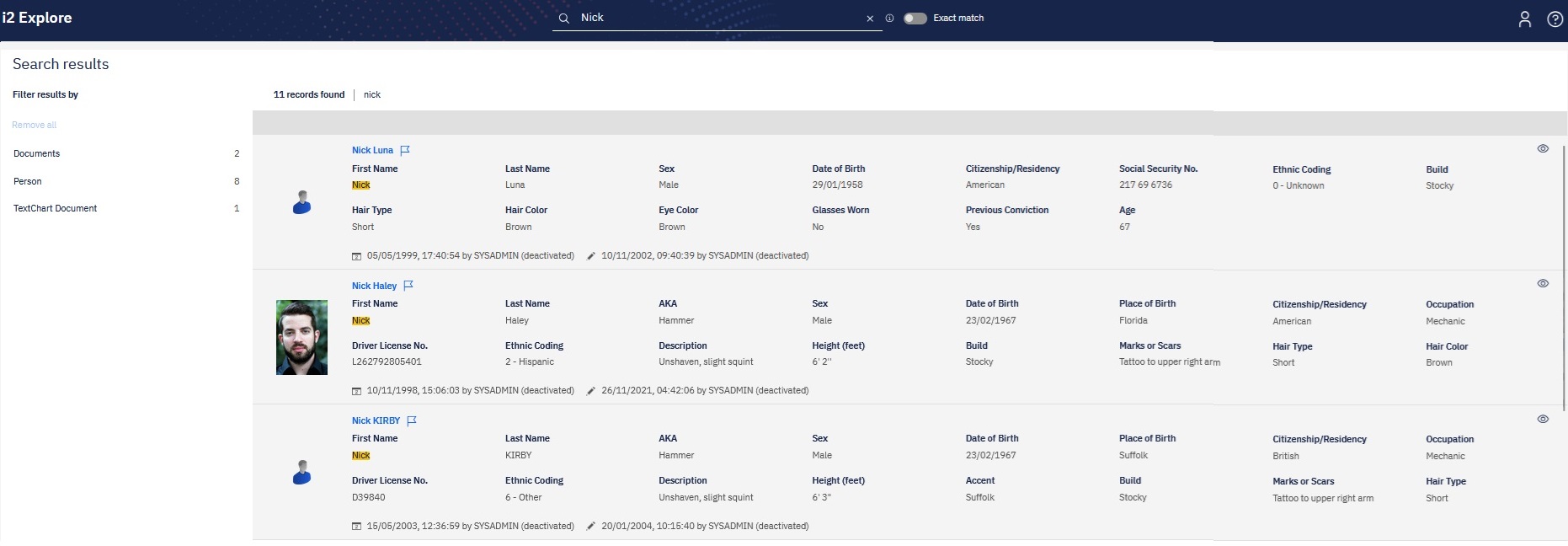
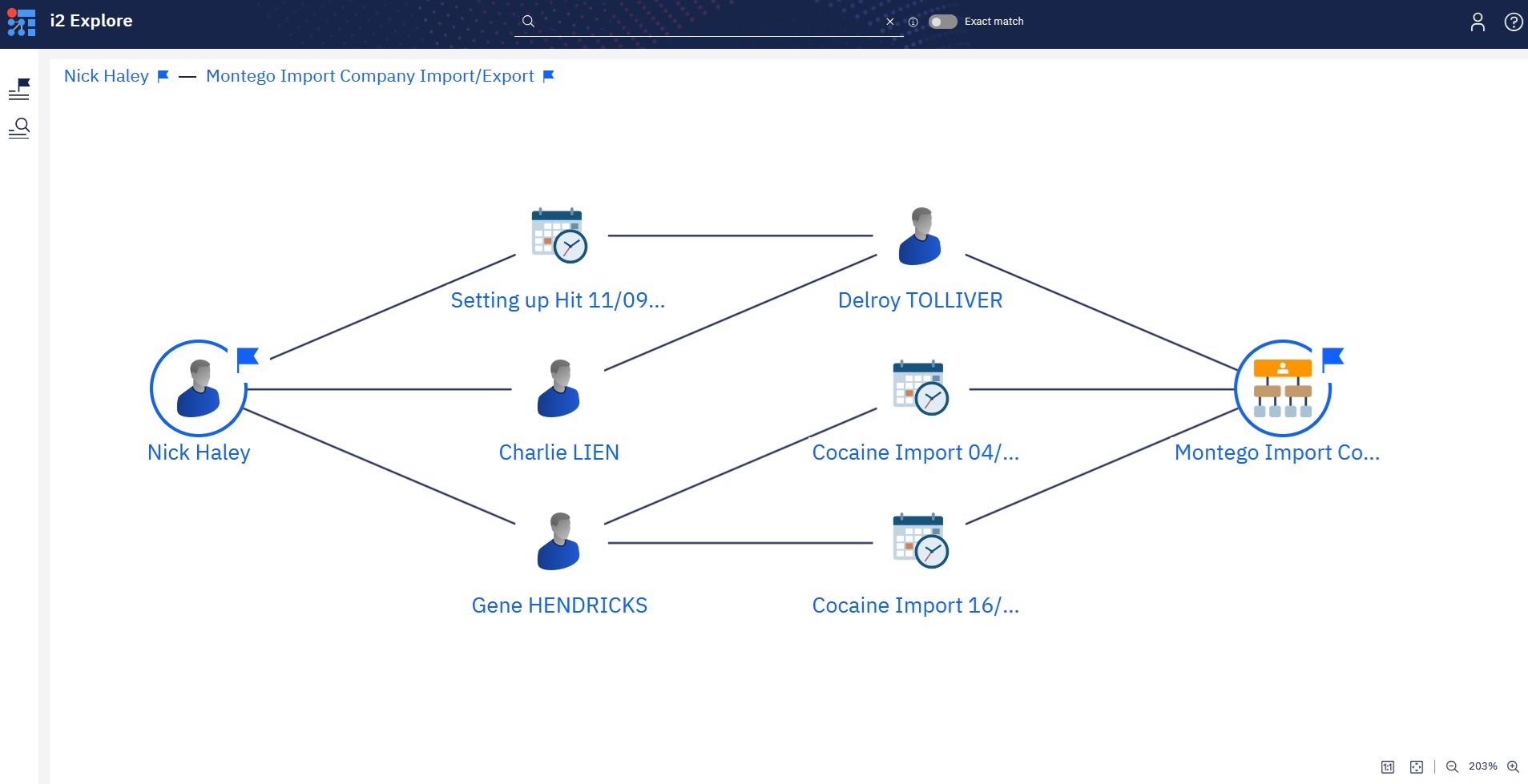
Empower your operational teams with direct access to iBase data. Effortlessly filter search results by entity, flag and save key records, and visualize connections to uncover critical insights. Sharing insights is just as easy—simply send a secure URL to any colleague with access to the tool.
Secure access to data
With read-only access to iBase Hub via any modern web browser, users can safely explore and analyze data without the risk of modifying or deleting records. i2 Explore is fully governed by the iBase security model, ensuring consistent access control and data integrity across your organization.
Highlight panels
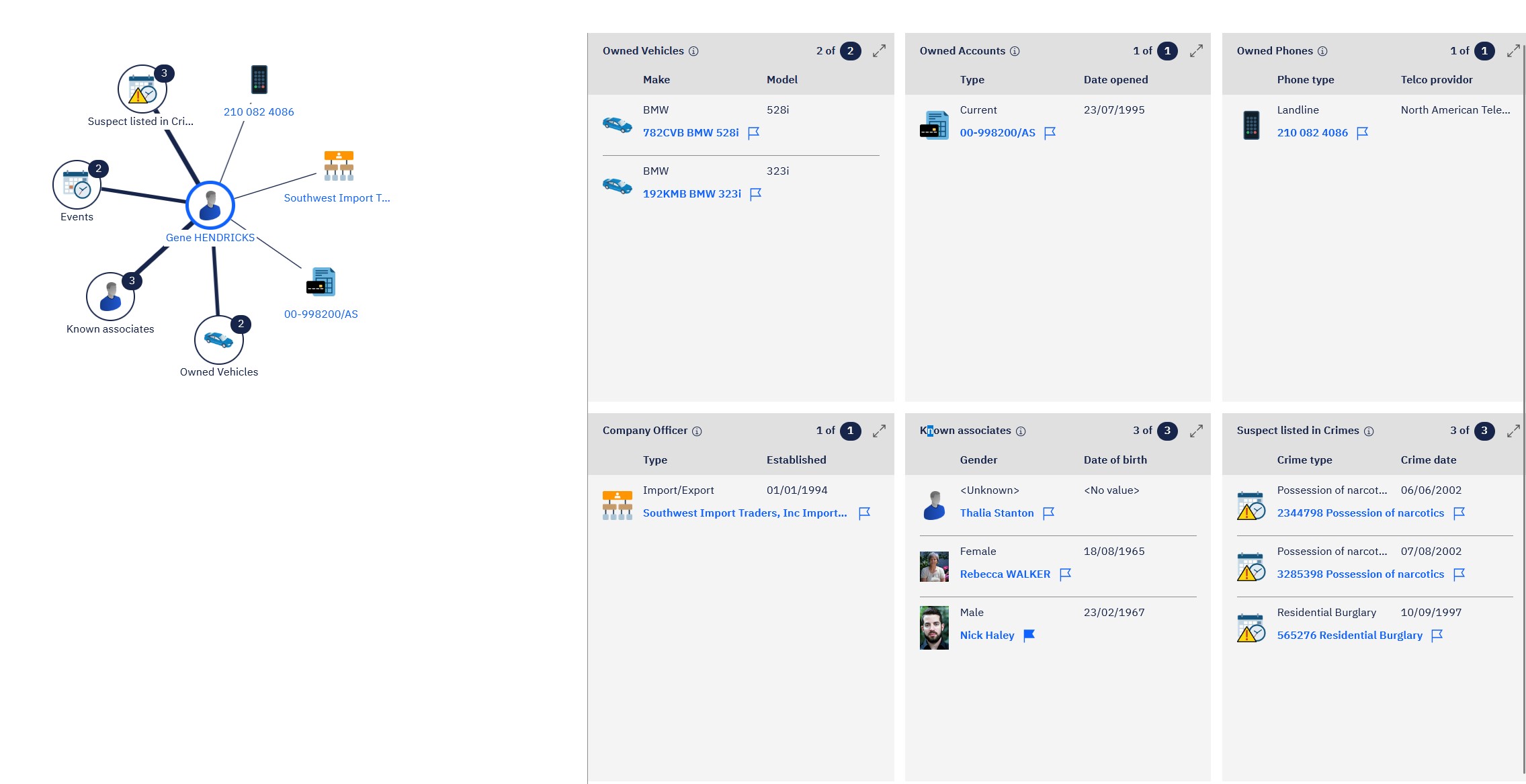
At deployment, customers can configure frequently used queries into tailored views for streamlined access to critical information. Users can also flag search results for future reference, enabling efficient follow-up and ongoing analysis.
The following table shows a comparison of features between recent versions of Analyst's Notebook:
🆕 = New Feature ✅ = Existing Feature ❌ = Feature Removed/Obsolete
| FEATURES | i2 Explore for iBase 1.2.0 |
|---|---|
| Web Interface | 🆕 |
| Search, Flag, and Find Path | 🆕 |
| Secure access to data | 🆕 |
| Highlight panels | 🆕 |
Fixed and known issues
The issues that have been fixed in this release, and known issues.
Fixed issues
| Issue Number | Issue title |
|---|---|
| Not applicable |
Known issues
| Issue Number | Issue title |
|---|---|
| Limitation | i2 Explore for iBase requires that the iBase database, security database and tempdb database use the same SQLServer Collation. |
| Limitation | i2 Explore for iBase does not currently support connection to an iBase database secured with SSL. |
Download information
Customers who have entitlement can request copies of i2 products.
For more information, see Where can I download the latest i2 products?
System requirements
The following tables shows the system requirements for this release, and previous releases. These system requirements should be used to ensure that the setup you are running is fully supported. Ensure that existing deployments are upgraded to currently supported versions of all the software required.
🆕 = Newly supported ✅ = Supported ❌ = No longer supported
Operating systems
| OPERATING SYSTEMS | i2 Explore for iBase 1.2.0 |
|---|---|
| Microsoft Windows 11 Enterprise x64 (64-bit) | ✅ |
| Microsoft Windows 11 Pro x64 (64-bit) | ✅ |
| Microsoft Windows 10 Enterprise x64 (64-bit) | ✅1 |
| Microsoft Windows 10 Pro x64 (64-bit) | ✅1 |
| Microsoft Windows Server 2022 Datacenter Edition | ✅ |
| Microsoft Windows Server 2022 Standard Edition | ✅ |
| Microsoft Windows Server 2019 Datacenter Edition | ✅ |
| Microsoft Windows Server 2019 Essentials Edition | ✅ |
| Microsoft Windows Server 2019 Standard Edition | ✅ |
1 Microsoft Windows 10 support will be deprecated in a future Explore for iBase release.
Note: i2 products are supported on hardware virtualization environments that run any of the operating systems that are listed in the detailed system requirements. When you run in a virtual environment, any issues that can be replicated by i2 in a supported operating system are addressed by using the standard support policy. Trial editions of i2 Analyst's Notebook cannot be run in virtualized environments.
Prerequisites
| SOFTWARE PREREQUISITES | i2 Explore for iBase 1.2.0 |
|---|---|
| i2 iBase 10.1.0 | ✅ |
| SUPPORTED DATABASES | i2 Explore for iBase 1.2.0 |
|---|---|
| Microsoft SQL Server 2022 (includes Linux editions)3 | ✅ |
| Microsoft SQL Server 2019 (includes Linux editions) | ✅ |
3 i2 Explore for iBase does not support Active Directory nor Entra ID for connecting to SQL Server.
Hardware i2 Explore for iBase
| Hardware Requirements | Minimum |
|---|---|
| Disk space | 4GB |
| Processor | 2 GHz x86-64 dual-core |
| Memory (Application server) | 2GB |
| Memory (JVM) | 8GB |
Note: The minimum hardware specifications specified in the table will allow customers to install and deploy i2 Analyze which is shipped with i2 Explore iBase on a single machine using the example deployment shipped with the on-prem toolkit. Hardware specs for an optimal i2 Analyze deployment are dependant on the expected amount of data to be loaded and user usage.
Language support
i2 products are tested on a number of various regional variations of operating systems. In addition they are translated into a number of different languages.
Operating system language support
i2 supports this product on the following regional versions of the supported operating systems:
| Language Group/Language | Language Collection | Support Status |
|---|---|---|
| Western Europe and USA | Basic | ✅ |
| Central Europe | Basic | ✅ |
| Baltic | Basic | ✅ |
| Cyrillic | Basic | ✅ |
| Turkic | Basic | ✅ |
| Arabic | Complex Script | ✅ |
| Japanese | East Asian | ✅ |
| Korean | East Asian | ✅ |
| Traditional Chinese | East Asian | ✅ |
| Simplified Chinese | East Asian | ✅ |
| Thai | Complex Script | ❌ |
| Vietnamese | Complex Script | ❌ |
| Greek | Basic | ❌ |
| Hebrew | Complex Script | ❌ |
| Indic | Complex Script | ❌ |
| Georgian | Complex Script | ❌ |
| Armenian | Complex Script | ❌ |
| Dhivehi | Complex Script | ❌ |
| Galician | Complex Script | ❌ |
| Gujarati | Complex Script | ❌ |
| Kannada | Complex Script | ❌ |
| Kyrgyz | Complex Script | ❌ |
| Mongolian (Cyrillic) | Complex Script | ❌ |
| Punjabi | Complex Script | ❌ |
| Syriac | Complex Script | ❌ |
| Telugu | Complex Script | ❌ |
Data support
i2 products support unicode data.
Translations
The following languages are supported:
| Translations | i2 Explore for iBase |
|---|---|
| Arabic | ✅ |
| Brazilian Portuguese | ✅ |
| Bulgarian | ✅ |
| Czech | ✅ |
| English | ✅ |
| French | ✅ |
| German | ✅ |
| Hungarian | ✅ |
| Italian | ✅ |
| Japanese | ✅ |
| Korean | ✅ |
| Polish | ✅ |
| Russian | ✅ |
| Simplified Chinese | ✅ |
| Spanish | ✅ |
| Traditional Chinese | ✅ |
| Turkish | ✅ |
| Ukrainian | ✅ |