Release notes - Analysis Hub Oct.2025
A high-level overview of the release, listing new features, the system requirements, and any known issues.
Important notices
⚠️ Installation - i2 Analyst's Notebook (ANB) desktop client
After downloading the distribution media for ANB, ensure that you extract all of the product components from the compressed file. This can be done using the "Extract All..." option on the Windows right-click menu.
Then, using Windows Explorer, browse to the root of the extracted folder and run setup.exe and follow the installation prompts.
⚠️ i2 iBridge
iBridge (all versions) will not interoperate with the versions of the Analyst's Notebook desktop client later than 10.1.0. iBridge customers are advised to continue to use the latest 32-bit Analyst's Notebook Premium version compatible with their version of iBridge.
Features
Release highlights
The following new and updated features are available in this release:
| Analyst's Notebook client (ANB) |
|---|
| New icons |
| Filtered search for types and attributes |
| New selection options |
| Improved snapshot control |
| Improved link corner behavior |
| iBase |
|---|
| Scheduled Queries and Scored Matching |
| Scored Matching Enhancements |
| Support for Microsoft Office 2024 |
| Support for Esri ArcGIS Pro 3.5 |
| ANB Web client |
|---|
| Web client new icons |
| Chart item grouping and customization |
| Label management enhancements |
| Importer enhancements |
| Ribbon reorganization |
| Product information |
| Badges |
Release highlight details - Analyst's Notebook 10.1.1
New icons
70 new icons have been added to address contemporary issues. The standard template has similarly been augmented with new entity types using the additional icons.

Filtered search for types and attributes
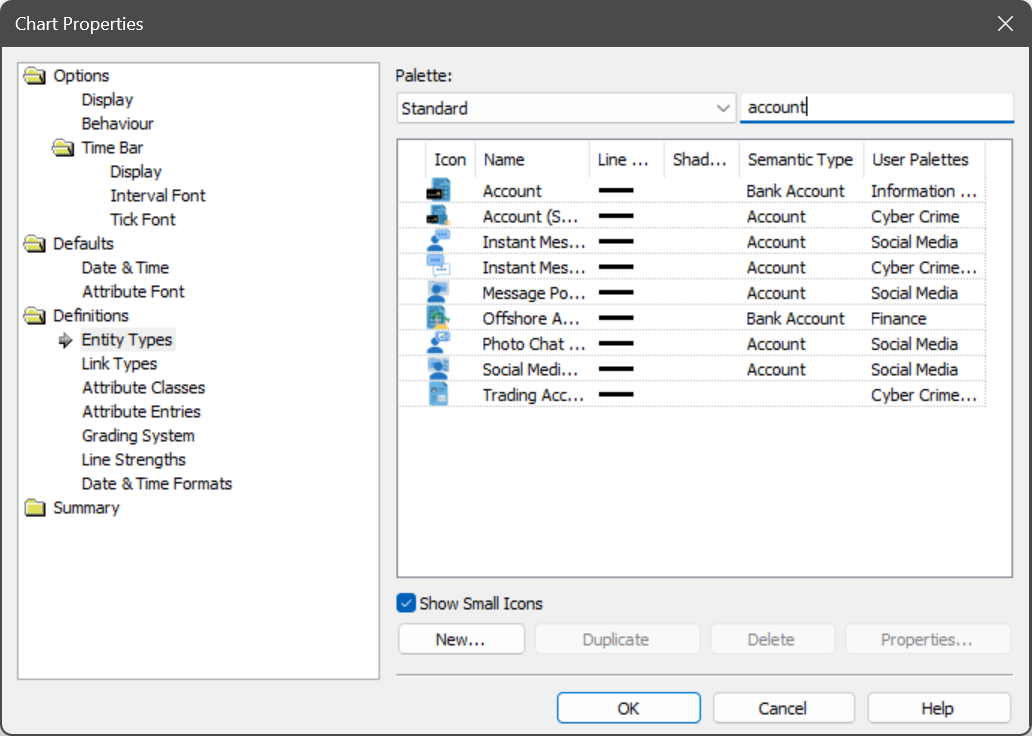
Within the Chart Properties dialog, you are now able to search through lists of entity and link types, as well as attribute classes and entries, to simplify finding the item of interest in long lists.
New selection options
Additional selection options can be found in the Selection ribbon menu that apply when executing any of the selection commands. They allow:
- Automatically fitting the window to the selection.
- Include hidden item and show on selection.
- Control the display of corner handles for selected links.

Improved snapshot handling
Within the Publish ribbon menu, the creation and access to snapshots has been improved, allowing the user to:
- Quickly create a new snapshot via a single click.
- Move to the next or previous snapshot in the sequence.
- Move to the first or last snapshot in the sequence.

Improved link corner behavior
- Corners on links in charts will only display their control handles when the link is either hovered over or selected, reducing clutter on the chart.
Release highlight details - iBase 10.1.2
In addition to bug fixes and other improvements, the key highlights are:
Scheduled Queries and Scored Matching
- You can now automate your analytical processes by scheduling both queries and Scored Matching tasks to run at predefined times. This powerful new capability helps to save valuable analyst time and ensures that you are always working with the most up-to-date intelligence.
Scored Matching Enhancements
- Scored Matching has been significantly improved to provide more targeted and flexible analysis. You can now score records based on their membership in a specific set, or by their presence in any set within a designated category. This allows for more sophisticated matching strategies, helping you to prioritize records and uncover connections based on predefined collections of interest.
Support for Microsoft Office 2024
- iBase now supports Microsoft Office 2024.
Support for Esri ArcGIS Pro 3.5
- iBase now supports Esri ArcGIS Pro 3.5.
Release highlight details - ANB Web client
Web client new icons
- New icons have been added to address contemporary issues. See New icons for more information.
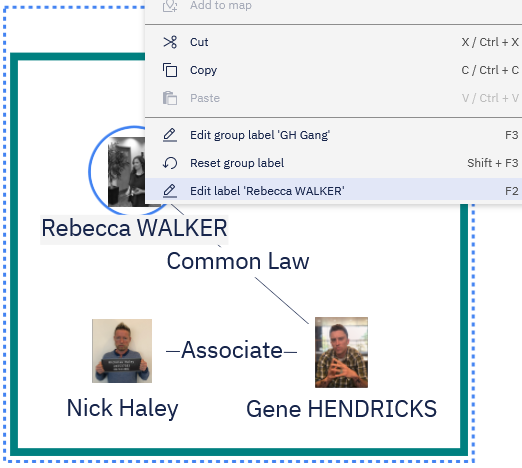
Chart item grouping and customization
Introduces the ability to group items on the chart, enhancing readability and organization. Users can collapse groups to minimize the number of items displayed, reducing visual clutter, and expand them to view the constituent items.
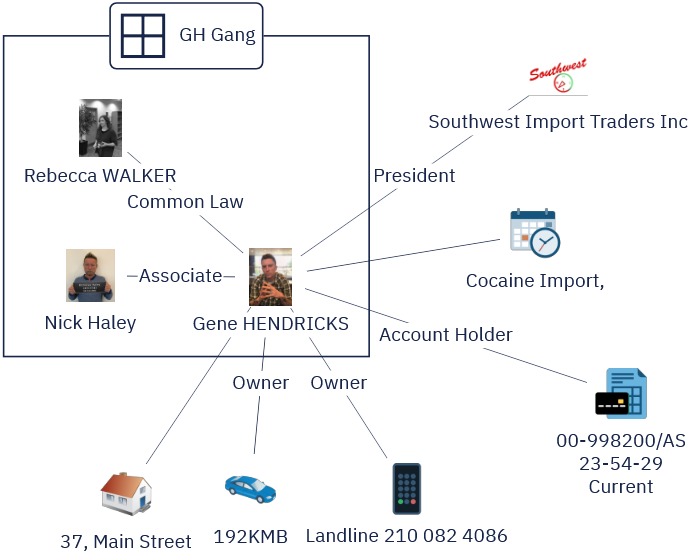
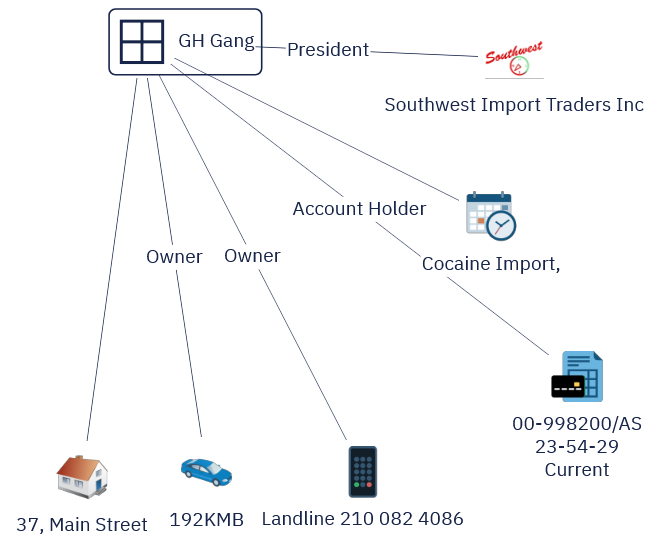
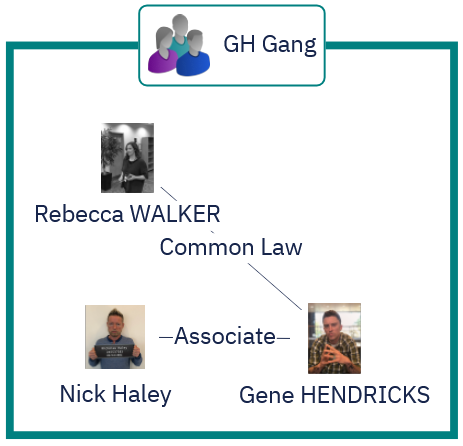
Group customization is also available, allowing users to modify the group label and styling. This feature supports standard chart editing capabilities, including add, edit, remove, and undo/redo actions.
Label management enhancements
Users can now set, edit, and reset labels for chart elements and groups directly on the chart surface, allowing them to replace existing labels or revert to the default first-record-label.
Importer enhancements
The importer has been enhanced to provide users with greater control over data import settings. Key configurable parameters now include:
- Delimiter selection for delimiter-separated files, allowing users to specify the separator used in their data files.
- Starting row specification, enabling users to define where data import begins within the file.
- File encoding selection, ensuring compatibility with various data formats and character sets.
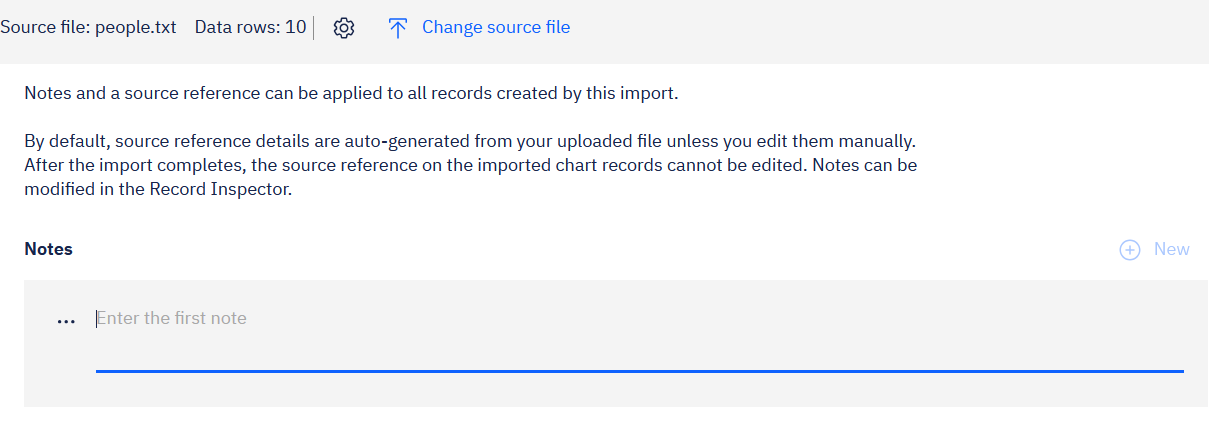
Multiple notes can now be added to all records during the import process, enhancing data enrichment and annotation capabilities.
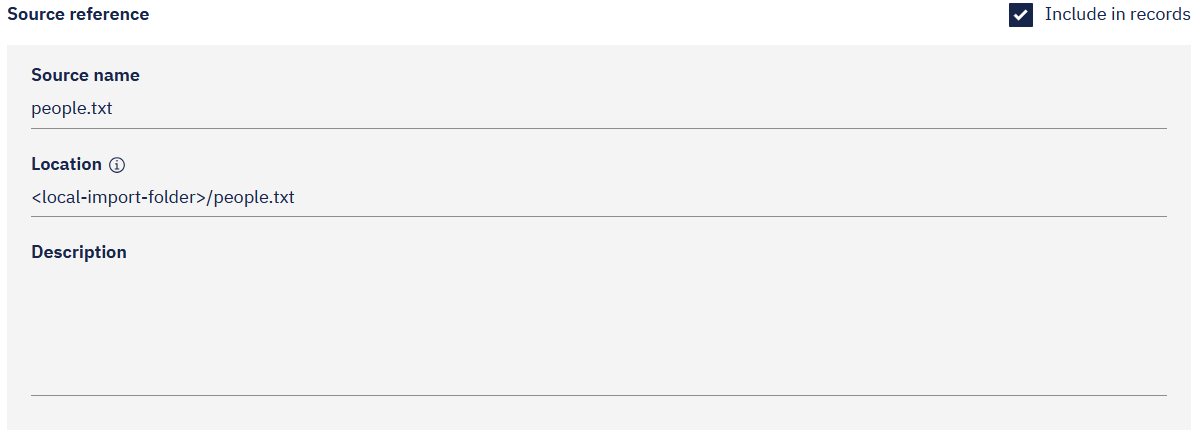
The importer can auto-generate a source reference based on the data file path, which can be optionally included in imported records to improve data traceability and origin tracking.
Ribbon reorganization
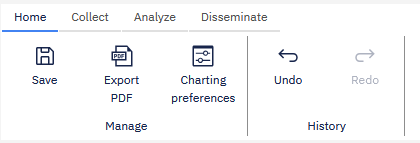
The ribbon has been reorganized into multiple tabs, grouping related commands in a logical and intuitive manner to improve discoverability and navigation.
Product information
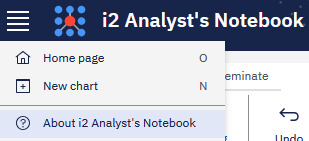
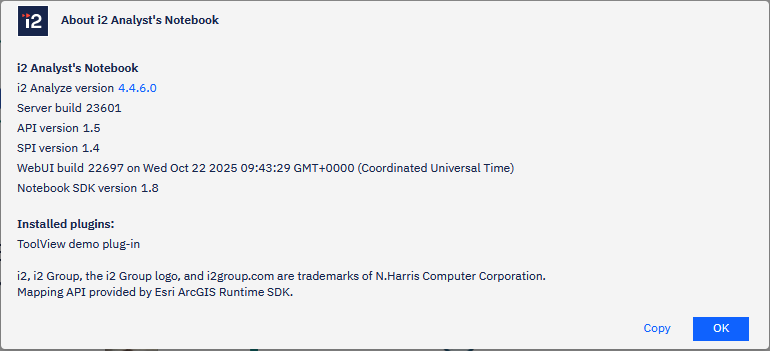
An "About" section has been added to the client, providing users with easy access to key information, including the client version, server version, and SDK details. This centralized location enables users to quickly gather relevant information when reporting issues to i2.
Badges
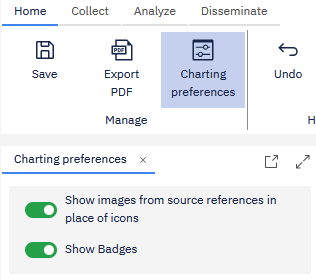
A badge is a small visual indicator that displays the number of chart items contained within a minimized group or the number of unified records within a chart item, allowing users to quickly identify and understand the data at a glance. To enable badge visualization, navigate to the "Charting Preferences" section in the ribbon and toggle on the "Show Badges" option.

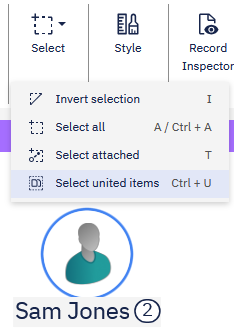
A new "Select United Items" command has been added, allowing users to quickly identify and select all chart items that contain multiple underlying records.
Release highlight details - i2 Analyze 4.4.6
No changes.
Integrated product versions
| Product included | Version |
|---|---|
| i2 Analyst's Notebook | 10.1.1 |
| i2 Analyze | 4.4.6 |
| i2 Analyst's Notebook Connector for Esri | 10.1.1 |
| i2 iBase | 10.1.2 |
| Connector Designer1 | 1.2.0 |
| Open Liberty 25 | 25.0.0.9 |
| Eclipse Temurin JDK 17 | 17.0.16 |
1 The Connector Designer and deployment guidance are available at https://docs.i2group.com/as/as-connector-designer.html.
| Recommendation Engine Add-On - Product included | Version |
|---|---|
| IBM InfoSphere Identity Insight | 10.0 |
| Explore for Hub Add-On - Product included | Version |
|---|---|
| i2 Analyze | 4.4.6 |
| ANB Web client Add-On - Product included | Version |
|---|---|
| i2 Analyze | 4.4.6 |
Upgrading
To ensure compatibility, i2 recommends that the i2 Analyst's Notebook desktop client and i2 Analyze server are upgraded to the latest versions at the same time.
i2 do not support mixed version deployments, but to assist with larger deployment upgrades it is possible to use the i2 Analyst's Notebook desktop client or an i2 Analyze server from a previous version with the corresponding latest versions in this release. However, some functionality might not be available in these configurations. Mixed version deployments should be aligned as quickly as possible to ensure product support.
Contact i2 Support to understand which versions can be used together in the short term for an unsupported mixed version deployment.
Version by Version comparison
The following table shows a comparison of features between recent versions of Analysis Hub:
🆕 = New Feature ✅ = Existing Feature ❌ = Feature Removed/Obsolete
| FEATURES - i2 Analyze and clients (ANB & ANB Web client) | Analysis Hub Oct.2025 | Analysis Hub Apr.2025.2 | Analysis Hub Aug.2024 | Analysis Hub Nov.2023 |
|---|---|---|---|---|
| ANB - New icons | 🆕 | - | - | - |
| ANB - Filtered search for types and attributes | 🆕 | - | - | - |
| ANB - New selection options | 🆕 | - | - | - |
| ANB - Improved snapshot control | 🆕 | - | - | - |
| ANB - Improved link corner behavior | 🆕 | - | - | - |
| Web client - Web client new icons | 🆕 | - | - | - |
| Web client - Chart item grouping and customization | 🆕 | - | - | - |
| Web client - Label management enhancements | 🆕 | - | - | - |
| Web client - Importer enhancements | 🆕 | - | - | - |
| Web client - Ribbon reorganization | 🆕 | - | - | - |
| Web client - Product information | 🆕 | - | - | - |
| Web client - Badges | 🆕 | - | - | - |
| ANB - Updated user interface | ✅ | 🆕 | - | - |
| ANB - High quality attribute symbols | ✅ | 🆕 | - | - |
| ANB - Improved Icon selector | ✅ | 🆕 | - | - |
| ANB - Custom type seeded searches | ✅ | 🆕 | - | - |
| ANB - Custom type sharing | ✅ | 🆕 | - | - |
| Web client - Chart item importer | ✅ | 🆕 | - | - |
| Web client - General Chart Improvements | ✅ | 🆕 | - | - |
| Export group membership from admin UI | ✅ | 🆕 | - | - |
| ANB - Analyst's Notebook single installer | ✅ | ✅ | 🆕 | - |
| ANB - Highlight tool options and animations | ✅ | ✅ | 🆕 | - |
| ANB - Record count badges | ✅ | ✅ | 🆕 | - |
| ANB - Attribute display control | ✅ | ✅ | 🆕 | - |
| ANB - Chart item group naming | ✅ | ✅ | 🆕 | - |
| ANB - Enhanced chart collaboration | ✅ | ✅ | 🆕 | - |
| ANB - Performance improvements - saving/loading & copy/paste | ✅ | ✅ | 🆕 | - |
| ANB & web client - Extended source reference image display | ✅ | ✅ | 🆕 | - |
| ANB & web client - Visual Query sharing | ✅ | ✅ | 🆕 | - |
| ANB & web client - Visual Query logical operators and conditional blocks | ✅ | ✅ | 🆕 | - |
| Web client - Chart item importer | ✅ | ✅ | 🆕 | - |
| Web client - Chart item palette | ✅ | ✅ | 🆕 | - |
| Web client - Editable chart records | ✅ | ✅ | 🆕 | - |
| Modernized icon set | ✅ | ✅ | 🆕 | - |
| Dynamic connector configuration updates | ✅ | ✅ | 🆕 | - |
| Visual Query termination and audit | ✅ | ✅ | 🆕 | - |
| ANBP - Additional new icons | ✅ | ✅ | ✅ | 🆕 |
| ANBP - Performance improvements | ✅ | ✅ | ✅ | 🆕 |
| ANBP - Usability improvements | ✅ | ✅ | ✅ | 🆕 |
| ANBP - Single sign on for i2 Esri Maps | ✅ | ✅ | ✅ | 🆕 |
| ANBP - Support for Esri ArcGIS Enterprise 11 | ✅ | ✅ | ✅ | 🆕 |
| ANBP - Flexible Schemas | ✅ | ✅ | ✅ | 🆕 |
| ANBP - Set default charting scheme | ✅ | ✅ | ✅ | 🆕 |
| ANBP - Auto-add to maps configuration | ✅ | ✅ | ✅ | 🆕 |
| ANBP - Import undo | ✅ | ✅ | ✅ | 🆕 |
| ANBP & web client - Enhanced language support | ✅ | ✅ | ✅ | 🆕 |
| ANBP & web client - Source Reference image display | ✅ | ✅ | ✅ | 🆕 |
| ANBP & web client - Display environment name | ✅ | ✅ | ✅ | 🆕 |
| ANBP & web client - Send highlight panel results to chart | ✅ | ✅ | ✅ | 🆕 |
| Web client - Support for system matching rules | ✅ | ✅ | ✅ | 🆕 |
| Web client - Copy and Paste web chart items | ✅ | ✅ | ✅ | 🆕 |
| Web client - Enhanced chart record data | ✅ | ✅ | ✅ | 🆕 |
| SOLR 9 | ✅ | ✅ | ✅ | 🆕 |
| FEATURES - External Searches | Analysis Hub Oct.2025 | Analysis Hub Apr.2025.2 | Analysis Hub Aug.2024 | Analysis Hub Nov.2023 |
|---|---|---|---|---|
| Connector Designer | ✅ | ✅ | 🆕 | - |
| Dynamic connector configuration changes | ✅ | ✅ | 🆕 | - |
| Visual Query for external searches | ✅ | ✅ | ✅ | ✅ |
Fixed and known issues
The issues that have been fixed in this release, and known issues:
Download information
Customers who have entitlement can request copies of i2 products.
For more information, see Where can I download the latest i2 products?
System requirements - Analyst's Notebook (ANB) desktop client
The following tables show the system requirements for this release and previous releases. These system requirements should be used to ensure that the setup you are running is fully supported. Ensure that existing deployments are upgraded to currently supported versions of all the required software.
🆕 = Newly supported ✅ = Supported ❌ = No longer supported
Operating systems - ANB desktop client
| OPERATING SYSTEMS | Analyst's Notebook 10.1.1 | Analyst's Notebook 10.1.0 | Analyst's Notebook 10.0.2 | Analyst's Notebook 10.0.1 |
|---|---|---|---|---|
| Microsoft Windows 11 Enterprise x64 (64-bit) | ✅ | ✅ | ✅ | ✅ |
| Microsoft Windows 11 Pro x64 (64-bit) | ✅ | ✅ | ✅ | ✅ |
| Microsoft Windows 10 Enterprise x64 (64-bit) | ✅2 | ✅ | ✅ | ✅ |
| Microsoft Windows 10 Pro x64 (64-bit) | ✅2 | ✅ | ✅ | ✅ |
| Microsoft Windows Server 2022 Datacenter Edition | ✅ | ✅ | ✅ | ✅ |
| Microsoft Windows Server 2022 Standard Edition | ✅ | ✅ | ✅ | ✅ |
| Microsoft Windows Server 2019 Datacenter Edition | ✅ | ✅ | ✅ | ✅ |
| Microsoft Windows Server 2019 Essentials Edition | ✅ | ✅ | ✅ | ✅ |
| Microsoft Windows Server 2019 Standard Edition | ✅ | ✅ | ✅ | ✅ |
| Microsoft Windows Server 2016 Datacenter Edition | ✅2 | ✅ | ✅ | ✅ |
| Microsoft Windows Server 2016 Essentials Edition | ✅2 | ✅ | ✅ | ✅ |
| Microsoft Windows Server 2016 Standard Edition | ✅2 | ✅ | ✅ | ✅ |
Note: i2 products are supported on hardware virtualization environments that run any of the operating systems listed in the detailed system requirements. When you run in a virtual environment, any issues that can be replicated by i2 in a supported operating system are addressed by using the standard support policy.
Prerequisites - ANB desktop client
| SOFTWARE PREREQUISITES | Analyst's Notebook 10.1.1 | Analyst's Notebook 10.1.0 | Analyst's Notebook 10.0.2 | Analyst's Notebook 10.0.1 |
|---|---|---|---|---|
| Microsoft Edge (latest) or Microsoft Edge WebView2 | ✅ | ✅ | ✅ | ✅ |
| Microsoft .NET Framework 4.8 | ✅ | ✅ | ✅ | ✅ |
| Microsoft Access database engine 2016 (64-bit)3 | ✅ | ✅ | ✅ | ✅ |
Note: Microsoft Edge Webview2 is available from https://developer.microsoft.com/en-us/microsoft-edge/webview2/. It must be installed by choosing the right-click option to "Run as administrator".
3 Importing from an Excel spreadsheet into Analyst's Notebook requires the Microsoft Access database engine 2016 (64-bit) to be installed.
Supported software (optional) - ANB desktop client
| COMPATIBLE i2 COMPANION PRODUCTS |
|---|
| i2 Analyst's Notebook Connector for Esri 10.1.1 |
| i2 TextChart 10.1.1 |
| SUPPORTED SOFTWARE | Analyst's Notebook 10.1.1 | Analyst's Notebook 10.1.0 | Analyst's Notebook 10.0.2 | Analyst's Notebook 10.0.1 |
|---|---|---|---|---|
| Microsoft Office 365 64-bit | ✅ | ✅ | ✅ | ✅ |
| Microsoft Office 2021 64-bit | ✅ | ✅ | ✅ | ✅ |
| Microsoft Office 2019 64-bit | ✅4 | ✅ | ✅ | ✅ |
| Microsoft Office 2016 64-bit | ❌ | ❌ | ❌ | ✅ |
| Esri ArcGIS Enterprise 11 (Portal for ArcGIS; optional, for i2 Esri Maps)5 | ✅ | ✅ | ✅ | 🆕 |
| Esri ArcGIS Enterprise 10 (Portal for ArcGIS; optional, for i2 Esri Maps)5 | ✅ | ✅ | ✅ | ✅ |
4 Microsoft Office 2019 support will be deprecated in a future Analyst's Notebook release.
5 Specific version support is determined by Esri product lifecycle statement.
Hardware - ANB desktop client
| Hardware requirements | Minimum | Recommended |
|---|---|---|
| Disk space | 1GB for installation plus additional working space | |
| Processor | Intel or AMD processor with 64-bit and SSE 4.2 support | |
| 2GHz or faster | ||
| Memory | 8GB | 16GB |
| Display | 1280 x 768 | 1920 x 1080 |
System requirements - i2 Analyze Server
🆕 = Newly supported ✅ = Supported ❌ = No longer supported
Operating systems - i2 Analyze Server
The following tables show the system requirements for this release and previous releases. These system requirements should be used to ensure that the setup you are running is fully supported. Ensure that existing deployments are upgraded to currently supported versions of all the required software.
| OPERATING SYSTEMS | i2 Analyze 4.4.6 | i2 Analyze 4.4.5 | i2 Analyze 4.4.4 | i2 Analyze 4.4.3 |
|---|---|---|---|---|
| Microsoft Windows Server 2022 Datacenter Edition | ✅ | ✅ | ✅ | ✅ |
| Microsoft Windows Server 2022 Essentials Edition | ✅ | ✅ | ✅ | ✅ |
| Microsoft Windows Server 2022 Standard Edition | ✅ | ✅ | ✅ | ✅ |
| Microsoft Windows Server 2019 Datacenter Edition | ✅ | ✅ | ✅ | ✅ |
| Microsoft Windows Server 2019 Essentials Edition | ✅ | ✅ | ✅ | ✅ |
| Microsoft Windows Server 2019 Standard Edition | ✅ | ✅ | ✅ | ✅ |
| Microsoft Windows Server 2016 Datacenter Edition | ✅ 6 | ✅ | ✅ | ✅ |
| Microsoft Windows Server 2016 Essentials Edition | ✅ 6 | ✅ | ✅ | ✅ |
| Microsoft Windows Server 2016 Standard Edition | ✅ 6 | ✅ | ✅ | ✅ |
| Linux Red Hat Enterprise V9 and fix packs7 | ✅ | ✅ | ✅ | ✅ |
| Linux Red Hat Enterprise V8 and fix packs7 | ✅ | ✅ | ✅ | ✅ |
6 Microsoft Windows Server 2016 support will be deprecated in a future i2 Analyze release.
7 Support for Red Hat Enterprise Linux (RHEL) Server on POWER Systems is restricted to IBM Db2 and SOLR as part of a distributed deployment.
Note: i2 products are supported on hardware virtualization environments that run any of the operating systems that are listed in the detailed system requirements. When you run in a virtual environment, any issues that can be replicated by i2 in a supported operating system are addressed by using the standard support policy.
Installation of Connector Designer requires x64 Linux, Docker Engine, and an internet connection. See https://docs.i2group.com/as/as-connector-designer.html for full details.
Installed Software - i2 Analyze Server
| INSTALLED SOFTWARE | i2 Analyze 4.4.6 | i2 Analyze 4.4.5 | i2 Analyze 4.4.4 | i2 Analyze 4.4.3 |
|---|---|---|---|---|
| Open Liberty 25 (25.0.0.9) | 🆕 | - | - | - |
| Open Liberty 25 (25.0.0.2) | ❌ | 🆕 | - | - |
| Open Liberty 24 (24.0.0.4) | ❌ | ❌ | 🆕 | - |
| Open Liberty 23 (23.0.0.9) | ❌ | ❌ | ❌ | 🆕 |
| Solr 9.9-i2-patch-wmic8 | ✅ | - | - | - |
| Solr 9.8.1 | ❌ | ✅ | - | - |
| Solr 9.6.1 | ❌ | ❌ | ✅ | - |
| Solr 9.4.0 | ❌ | ❌ | ❌ | ✅ |
| Zookeeper 3.9.4 | ✅ | - | - | - |
| Zookeeper 3.9.3 | ❌ | ✅ | - | - |
| Zookeeper 3.9.2 | ❌ | ❌ | ✅ | - |
| Zookeeper 3.8.3 | ❌ | ❌ | ❌ | ✅ |
8 A patched version of Solr, specifically 9.9-i2-patch-wmic, has been included in the i2 Analyze toolkit to address the impending deprecation of WMIC support on Windows. This custom version is provided to ensure continued compatibility and functionality. Note that the Solr community plans to release version 9.10 later in the year, which will also address the WMIC support issue. However, users of the i2 Analyze toolkit do not need to take any additional action, as the patched version 9.9-i2-patch-wmic is already included.
Note: Supplied and installed by the i2 Analyze toolkit.
Supported software - i2 Analyze Server
| SOFTWARE PREREQUISITES | i2 Analyze 4.4.6 | i2 Analyze 4.4.5 | i2 Analyze 4.4.4 | i2 Analyze 4.4.3 |
|---|---|---|---|---|
| PostgreSQL 17 - on Amazon Relational Database Service (RDS) | ✅ | - | - | - |
| PostgreSQL 17 | ✅ | - | - | - |
| PostgreSQL 16 - on Amazon Relational Database Service (RDS) | ✅ | ✅ | ✅ | - |
| PostgreSQL 16 | ✅ | ✅ | 🆕 | - |
| PostgreSQL 15 - on Amazon Relational Database Service (RDS) | ✅ | ✅ | ✅ | ✅ |
| PostgreSQL 15 | ✅ | ✅ | ✅ | ✅ |
| IBM DB2 Standard Edition 11.5 | ✅ | ✅ | ✅ | ✅ |
| IBM DB2 Advanced Edition 11.5 | ✅ | ✅ | ✅ | ✅ |
| IBM DB2 11.1 Workgroup, Enterprise, Advanced Workgroup, Advanced Enterprise | ✅ | ✅ | ✅ | ✅ |
| Microsoft SQL Server 2022 | ✅ | ✅ | ✅ | ✅ |
| Microsoft SQL Server 2019 | ✅ | ✅ | ✅ | ✅ |
| Microsoft SQL Server 2017 | ❌ | ❌ | ✅ | ✅ |
Hardware - i2 Analyze Server
| Hardware Requirements | Minimum |
|---|---|
| Disk space | 4GB |
| Processor | 2 GHz x86-64 dual-core |
| Memory (Application server) | 16GB |
| Memory (JVM) | 8GB |
Note: The minimum hardware specifications specified in the table will allow customers to install and deploy i2 Analyze on a single machine using the example deployment shipped with the on-prem toolkit. Hardware specs for an optimal i2 Analyze deployment are dependent on the expected amount of data to be loaded and user usage.
Supported Browsers - ANB Web client and Explore client
| Supported Web Browsers |
|---|
| Google Chrome (latest version) |
| Microsoft Edge (latest version) |
| Mozilla Firefox (latest version) |
| Mozilla Firefox ESR (latest version) |
Language support
i2 products are tested on a number of various regional variations of operating systems. In addition, they are translated into a number of different languages.
Operating system language support
i2 supports this product on the following regional versions of the supported operating systems:
| Language Group/Language | Language Collection | Support Status |
|---|---|---|
| Western Europe and USA | Basic | ✅ |
| Central Europe | Basic | ✅ |
| Baltic | Basic | ✅ |
| Cyrillic | Basic | ✅ |
| Turkic | Basic | ✅ |
| Arabic | Complex Script | ✅ |
| Japanese | East Asian | ✅ |
| Korean | East Asian | ✅ |
| Traditional Chinese | East Asian | ✅ |
| Simplified Chinese | East Asian | ✅ |
| Thai | Complex Script | ❌ |
| Vietnamese | Complex Script | ❌ |
| Greek | Basic | ❌ |
| Hebrew | Complex Script | ❌ |
| Indic | Complex Script | ❌ |
| Georgian | Complex Script | ❌ |
| Armenian | Complex Script | ❌ |
| Dhivehi | Complex Script | ❌ |
| Galician | Complex Script | ❌ |
| Gujarati | Complex Script | ❌ |
| Kannada | Complex Script | ❌ |
| Kyrgyz | Complex Script | ❌ |
| Mongolian (Cyrillic) | Complex Script | ❌ |
| Punjabi | Complex Script | ❌ |
| Syriac | Complex Script | ❌ |
| Telugu | Complex Script | ❌ |
Data support
i2 products support Unicode data.
Translations
The following languages are supported:
| Translations | Analysis Hub Oct.2025 |
|---|---|
| Arabic | ✅ |
| Brazilian Portuguese | ✅ |
| Bulgarian9 | ✅ |
| Czech | ✅ |
| English | ✅ |
| French | ✅ |
| German | ✅ |
| Hungarian10 | ✅ |
| Italian | ✅ |
| Japanese | ✅ |
| Korean | ✅ |
| Polish | ✅ |
| Russian9 | ✅ |
| Simplified Chinese | ✅ |
| Slovak10 | ✅ |
| Spanish | ✅ |
| Traditional Chinese | ✅ |
| Turkish | ✅ |
| Ukrainian9 | ✅ |
9 Help available in English only.
10 The Information Store and External Searches capabilities are not translated for these languages.